Some projects start as quick convenience scripts and quietly grow into something bigger. mergePDF started that way for me: a small Python utility to stitch together PDFs for school, work, and the occasional bureaucratic mess. It lived in my terminal, did its job, and did not try to be anything else.
Over time, one thing became obvious: tools only matter if people can actually use them.
The CLI version worked perfectly for me, but most people do not think in flags and file paths. They think in buttons, drag-and-drop, and clear outcomes. So I decided to take mergePDF and give it a proper interface that stayed clean, minimal, and accessible without losing the hacker aesthetic I like building around.
This is how that GUI came together.
Starting Point: A Simple PDF Merge Engine
The original mergePDF script was intentionally small. One core function, a few checks, and PyPDF2 doing the heavy lifting. When I open-sourced it, I kept the same philosophy: no unnecessary abstraction and no over-engineering.
The core behavior is straightforward:
- validate input files
- load each PDF
- append pages in order
- write a merged output file
- return a summary of files merged and pages written
That simplicity made it easy to build on.
Why Streamlit
Streamlit was the natural choice. I have used it before for fast Python GUI prototypes, and it consistently hits a useful balance between speed and flexibility. It is usually associated with dashboards and ML demos, but it also works well for utility tools when you want a working interface quickly without frontend overhead.
What made it a fit here:
- drag-and-drop uploads
- instant local hosting
- rapid iteration
- straightforward packaging
Most importantly, it gave me enough control to shape the interface style I wanted.
Designing the SOC Aesthetic
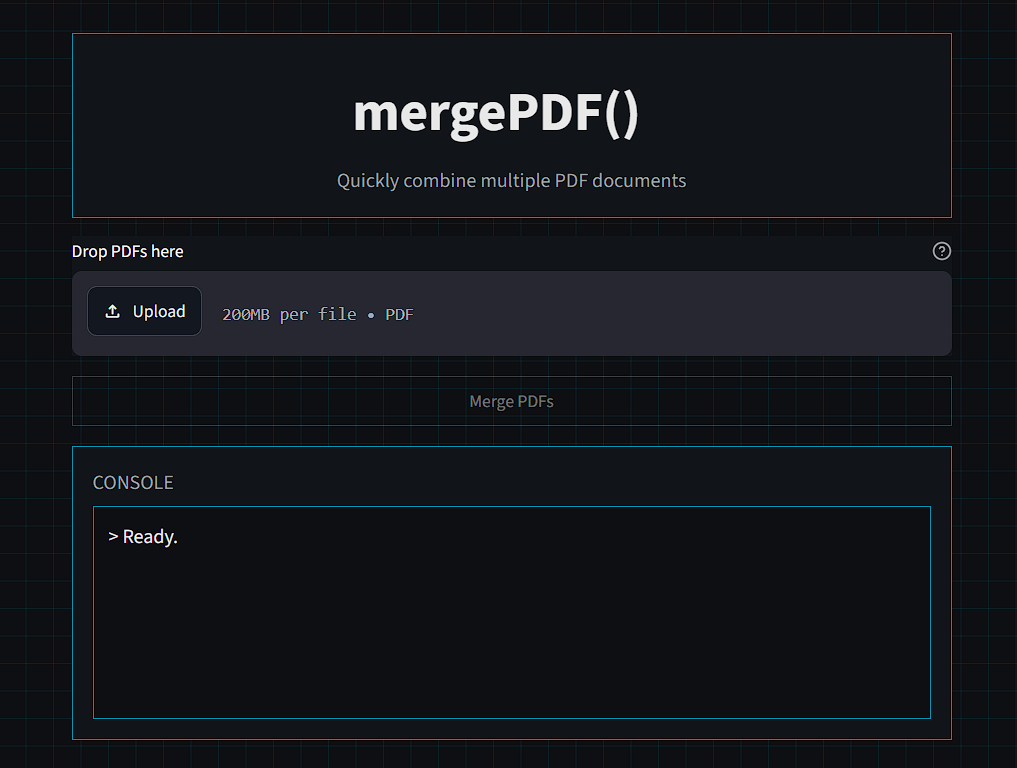
I did not want a soft, bubbly UI. I wanted a tool that felt like it belonged in a SOC workflow: dark surfaces, high contrast, neon accents, monospaced typography, and a console-style output area that reads like a log stream.
mergePDF follows that language:
- matte black background
- deep gray panels
- cyan accents
- JetBrains Mono typography
- subtle glow on key interactions
- squared edges
- minimal, uncluttered layout
The result still feels lightweight, but far more purposeful than a default app shell.
Building the Controller Layer
One of the best architectural decisions was keeping the GUI dumb.
The controller layer handles:
- file validation
- temporary workspace management
- calling the merge engine
- returning structured output to the interface
That separation keeps Streamlit code clean and prevents the UI from becoming a second implementation of merge logic. The GUI orchestrates, the engine executes, and the controller bridges the two.
It is the same design pattern I used in Linusec: isolate logic, isolate interface, connect with a thin controller.
Security and Reliability Notes
Because this is a local-first PDF merge tool, file handling matters:
- uploaded files are written to a temporary workspace
- processing stays local to the running environment
- output is generated from validated inputs in order
This keeps the pipeline predictable and easier to test as features expand.
The Final Result
The finished app is small, fast, and genuinely pleasant to use. You drop in PDFs, run merge, and get clear progress feedback from a console-like status stream.
It feels like a compact SOC utility that just happens to solve a very practical PDF problem.
The architecture also leaves room to grow without losing shape:
- the engine can gain features
- the controller can add workflow controls
- the UI can evolve independently
mergePDF started as a convenience script. Now it is a proper tool.
What’s Next
Next features I am considering:
- PDF splitting
- page rotation
- metadata editing
- compression
- multi-page GUI
- desktop packaging